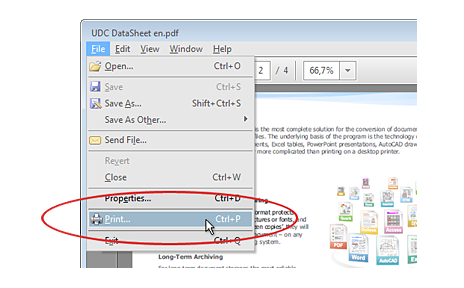
 1. Open PDF file and click "Print"
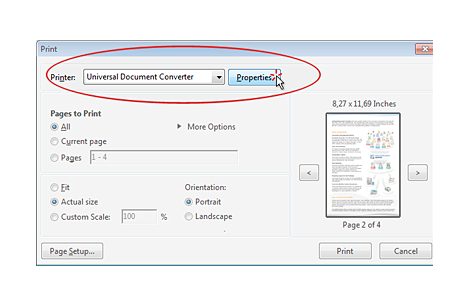 2. Open "Properties" of Universal Document Converter
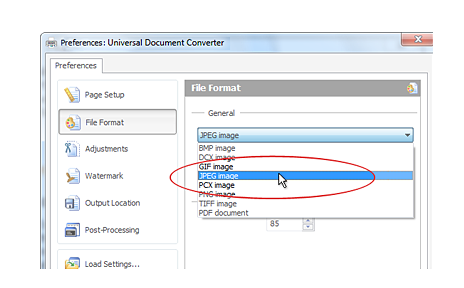 3. Select JPEG as output format
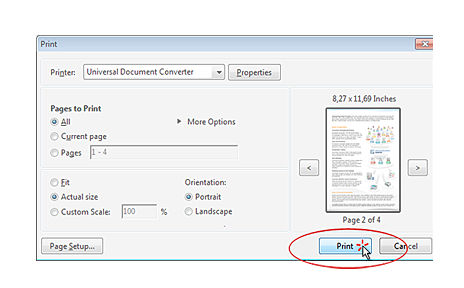 4. Click "Print" to start the conversion process
-
 Advanced algorithm for image quantization makes it possible to produce the highest quality output files
 -
 You can stamp a document with an image or text that can have rotation, opacity, color variation or other effects
 -
 Compatible with Microsoft® Windows® 8, 7, Vista and XP. Windows Server 2012, 2008 and 2003 are also supported
 -
 Universal Document Converter is ready for remote use via Microsoft Terminal Services, in Citrix environment and so on
-
 100â000+ satisfied customers use Universal Document Converter at home and in the office
 -
 1â000+ corporative clients ordered and deployed Universal Document Converter in enterprices
 -
 500+ non-profit and municipal organizations use Universal Document Converter in their everyday activity
 -
 300+ system integrators and independent developers included Universal Document Converter in dockflow systems
 "Universal Document Converter is simple to use, and customer support is excellent: should you need to contact them, you can expect a prompt, courteous, and informed reply. I highly recommend this excellent program!" Kathleen Dodge-DeHaven, USA
 "Universal Document Converter appears as a virtual printer through which you can choose a variety of output file formats: PDF, TIF multipage, and simple JPG. With Universal Document Converter I solved a number of organizational problems and speed up a myriad of tasks." Dr Ciro Bianco, Italy
 "I have used Universal Document Converter since the very first versions as my sole tool for making document conversions. It works flawlessly and is very user-friendly. I recommend Universal Document Converter for all business applications." Thomas Vass, USA
 "I'm very lucky to have Universal Document Converter and want to recommend it to all my colleagues and to those who need a simple and effective solution to the protection of their documents." Elizabeth Kotaeva, Russia